


Every fashion store eventually hits the same wall: the catalogue keeps growing, but the photography budget does not. Photography for fashion stores has traditionally meant booking a studio, a model and a crew for every new drop, a cost structure that scales badly the moment a collection doubles in size. Cutting that cost without letting quality slip is less about spending less on each shoot and more about rethinking how images get produced in the first place.
What Cutting Costs Without Losing Quality Really Means
Before touching budget, it helps to define the floor beneath it. A product page that converts needs a handful of non-negotiables: accurate colour, a clean and consistent background, sharp focus on fabric and stitching, and a pose or angle that shows how the garment actually sits. Anything below that threshold pushes shoppers toward the back button or, worse, toward a return once the item arrives looking nothing like the photo. Cost cutting only works if it protects these visual minimums rather than eroding them. The goal is not fewer details, it is a cheaper way of reaching the same detail, shot after shot.
Studio Shoots vs AI-Generated Imagery: A Real Cost Comparison
A traditional shoot carries a long list of fixed costs: studio rental by the hour, a photographer, often a stylist, and a model booked for a full day regardless of how many looks get through the schedule. Add retouching afterwards and a single day’s output rarely covers more than a few dozen finished images once revisions are factored in. AI-generated imagery collapses most of that chain. A flat-lay or a single reference photo becomes the only physical input needed, and the rest, model, pose, background, happens digitally. Where a studio day might produce a few dozen final images, an AI workflow can generate hundreds from the same starting material, at a fraction of the per-image cost. Turnaround shrinks from weeks to days, which matters as much as the invoice when a collection needs to go live on a fixed date.
From Flat-Lay to On-Model Without a Studio
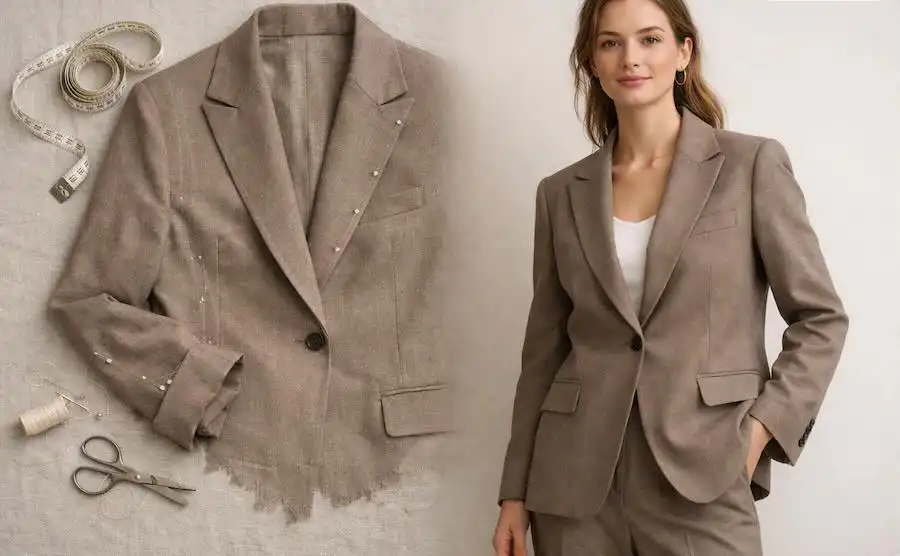
The method behind that shift is simpler than it sounds. Instead of dressing a live model, a store photographs the garment flat, the same kind of shot already used for internal reference or supplier catalogues, and feeds that image into a generation tool. Platforms such as On-Model, built by PiktID for fashion e-commerce, turn a flat-lay into on-model photos, preserving the actual print, seams and texture of the garment rather than approximating them. No studio booking, no model release, no waiting for a shooting slot that fits everyone’s calendar. A flat-lay taken in minutes on a light table can become a full on-model image without a single person ever trying the garment on. For stores juggling frequent small drops, that alone removes the single biggest scheduling bottleneck in the traditional process.
How to Keep Visual Consistency Across Your Catalogue
Cost savings mean little if the catalogue starts looking patchworked, one product shot under harsh light, the next under a warmer tone, a different model appearing every few pages. Consistency comes down to three variables held steady across every image: lighting temperature, background treatment and model identity. Locking these in place, rather than leaving them to whichever photographer or session happened to produce a given batch, is what makes a store’s visual language recognisable. A shopper should never be able to tell which week a product photo was taken in. That uniformity, more than any single striking image, is what makes a catalogue feel professional at scale.
A Practical Workflow to Scale Fashion Content at Lower Cost
A workable process starts with a foundation layer: one clean, timeless image per product, shot or generated once and reused for as long as the item stays in the catalogue. On top of that foundation, additional variants get layered in for campaigns, social posts or seasonal pages, without ever reshooting the base product. The real saving shows up over time, not on day one, once the same lightweight process repeats every few months instead of demanding a full new shoot each time. The workflow that keeps a store’s visuals current is the same one behind seasonal fashion photography, where backgrounds, styling and mood shift with each season while the underlying product images stay untouched. Planning that cadence in advance, rather than scrambling before each launch, is what turns a one-off cost saving into a permanent one.
Key Takeaways and Next Steps for Your Store
A few principles carry the whole approach. Protect the visual minimums first, since no saving is worth a page that stops converting. Compare the real cost per finished image, not just the cost per shoot, when weighing a studio day against a generated batch. Start from flat-lay inputs wherever possible, since they remove the biggest scheduling constraint in traditional photography. And build consistency into the process itself, locking lighting, background and model identity rather than leaving them to chance. A store that treats photography as a repeatable system, not a one-off event, is the one that scales its catalogue without scaling its budget in the same proportion. Testing an AI-based workflow on a small batch of existing products is usually the fastest way to see whether it holds up against a store’s own quality bar.