




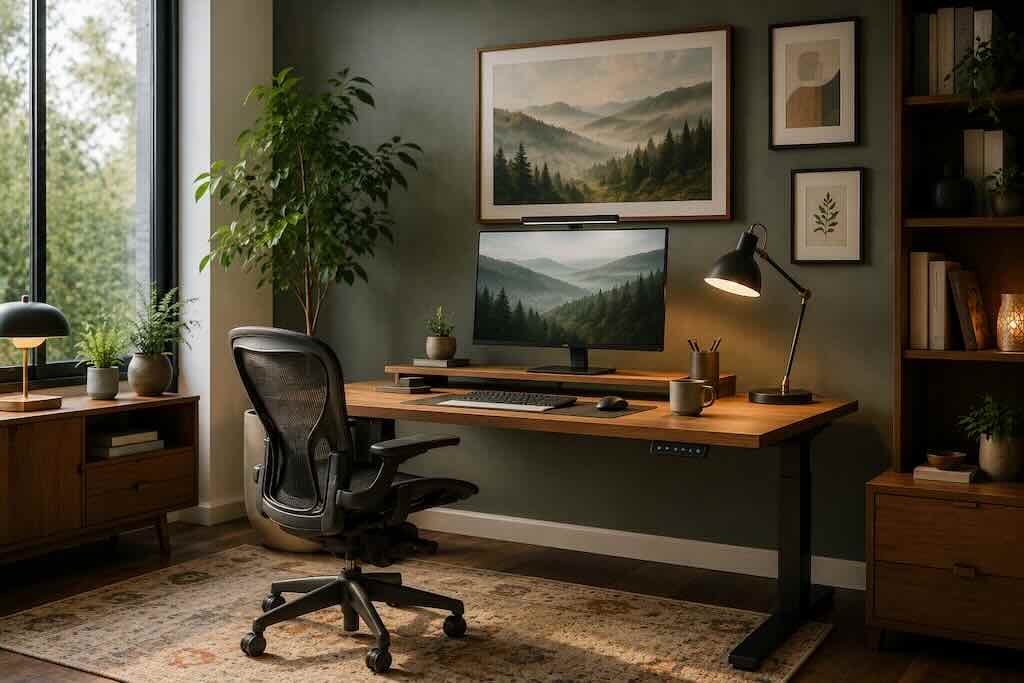
A home office works best when the room quietly disappears behind the work. The chair supports you without demanding attention. Daylight reaches the desk without washing across the screen. The objects in your peripheral vision feel considered rather than chaotic. Art adds character, but leaves enough visual space for the mind to settle.
Editor’s note: This article has been updated for 2026 to remove unsupported claims about color psychology, circadian lighting, office temperature and art-driven productivity, while adding current ergonomic guidance and a more evidence-aware approach to lighting, movement, nature and visual design.
Remote and hybrid work have made the home office a lasting part of domestic life for many people. Yet designing one well requires a different approach from decorating an ordinary room. It has to accommodate hours of concentrated computer use while still belonging to the home around it.
The useful question is not whether a workspace looks sufficiently professional on a video call. It is whether your body can work comfortably there, whether you can see the screen without glare, whether frequently used objects are within reach and whether the environment feels pleasant enough to spend time in.
Start With Ergonomics, Not Decoration
The most beautiful desk in the room will not compensate for a monitor that leaves your neck tilted upward for eight hours.
The Occupational Safety and Health Administration’s computer workstation guidance emphasizes adjustability rather than prescribing one perfect posture. The objective is to arrange the workstation so the body can remain in comfortable, relatively neutral positions while also allowing posture to change.
OSHA recommends placing the monitor directly in front of you, generally around 20 to 40 inches from your eyes, with the top of the screen at or slightly below eye level. Your chair should support your back and feet, while the keyboard and mouse should remain close enough that you are not repeatedly reaching across the desk.
If a laptop is your primary computer, a separate keyboard and pointing device can make a substantial difference because they allow the screen and input devices to be positioned independently.
Movement Matters More Than the Perfect Chair
An ergonomic chair is useful. Staying frozen in that chair for an entire working day is not.
OSHA recommends introducing short pauses into prolonged computer work: look away from the screen, stretch, stand or walk. A sit-stand desk can make changing position convenient, but standing all day should not become the new version of sitting all day.
Design the room to make movement natural. Keep water somewhere that requires you to stand. Take phone calls away from the monitor when the task allows it. Walk for a few minutes between long blocks of concentrated work.
The goal is variation.
Use Daylight Without Creating Screen Glare
A desk beside a window can be beautiful in the morning: pale light across timber, leaves moving outside, the room slowly brightening. Position it badly, however, and the same window becomes a bright reflection across your monitor.
OSHA’s workstation environment guidance recommends well-distributed, diffuse illumination for computer work and positioning screens at right angles to windows and other direct light sources where possible. Blinds or curtains can help control glare as daylight changes.
Layered lighting is usually more flexible than relying on one intense ceiling fixture. Ambient light can illuminate the room while an adjustable task lamp provides additional light for reading or writing without shining directly into the eyes or reflecting from the monitor.
Be cautious with claims that a particular smart bulb color will automatically increase concentration or synchronize everyone’s circadian rhythm. Lighting influences visual comfort and biological rhythms, but human responses depend on intensity, timing, duration and individual circumstances. There is no universal “productivity color” for an office lamp.
Create a Visual Boundary Between Work and Home
A dedicated office makes separation straightforward. A small apartment requires more imagination.
A compact desk in an alcove, a workstation behind cabinet doors or a carefully arranged corner can still create a recognizable work zone. What matters is that the space has enough physical definition to support a routine.
That does not mean your desk needs to become a “sacred” area where nothing unrelated to work is permitted. Psychological boundaries are personal. Instead, create a simple closing ritual at the end of the day: put the laptop away, clear cups and paperwork, switch off the task lamp and leave the work surface ready for tomorrow.
For more practical setup mistakes, see Divine’s guide to home office mistakes you should avoid.
Control Temperature for Comfort, Not a Magic Number
There is no single 22°C office temperature that guarantees peak productivity for everyone. Comfort depends on clothing, humidity, airflow, activity, personal preference and the characteristics of the room itself.
Instead of chasing a supposedly perfect thermostat setting, pay attention to persistent discomfort. Cold hands, direct drafts and a stuffy room can become distracting over a long working day. Adjustable heating, ventilation, fans, window coverings and clothing layers give you more control as conditions change.
Then Bring in the Art
Once the physical workstation functions properly, art can change the emotional temperature of the room.
This is where personal preference deserves more weight than internet color charts. A quiet landscape might offer a visual pause between calls. An abstract canvas can introduce movement into a restrained room. Photography can connect the office to a city, landscape or memory beyond its walls.
There is no reliable scientific formula saying lawyers should look at Dutch masters while designers need Van Gogh. Claims that particular paintings activate “lateral thinking centers” or that specific colors automatically generate creativity go beyond what the evidence can support.
Choose art because you want to live with it.
Nature Can Be a Useful Visual Reference
If there is one visual direction worth considering, it is a connection with nature. That might come through the window itself, a plant beside the desk, natural materials or artwork depicting landscapes and vegetation.
Research into natural environments and mental well-being suggests that exposure to nature can be associated with restorative and psychological benefits. That does not mean a landscape painting is clinically proven to lower your cortisol or improve professional performance. It simply gives us a sensible design principle: views that feel calm and restorative can be pleasant companions during screen-heavy work.
How to Choose Office Art
Begin with the room rather than your profession. Look at the available wall area, sightlines from the desk, natural light and existing materials.
- For small offices: One substantial piece can feel calmer than a wall fragmented into many competing objects.
- For neutral rooms: Artwork can introduce the strongest color in the space without requiring permanent changes to walls or furniture.
- For visually busy rooms: Photography, restrained abstraction or landscapes with generous negative space can keep the wall from becoming another source of visual noise.
- For creative studios: A picture ledge makes it easy to rotate sketches, prints, photographs and references as projects change.
- For video-call backgrounds: Position art deliberately rather than filling every visible section of wall. A single strong object, plant or framed work usually reads more clearly on camera.
If you are researching art movements or historical works, WikiArt provides a broad visual archive that can help identify artists, periods and styles before you decide what belongs in the room.
Choose the Frame as Part of the Architecture
A frame creates the transition between artwork and wall, so treat it as part of the room rather than an afterthought.
Natural oak works easily with pale timber, linen and warm neutral interiors. Slim black frames create sharper contrast against white, cream or stone-colored walls. Floating frames can give canvas works a cleaner architectural edge.
Or ignore those conventions entirely when the artwork calls for something different. An ornate antique frame can look extraordinary inside an otherwise minimal contemporary office precisely because it introduces tension.
Avoid Designing Around Short-Lived Trends
The strongest home offices rarely need to announce what year they were designed.
Terms such as “organic modern,” “biophilic office” and “cloffice” can be useful shorthand, but trends move quickly. A better foundation is quieter: comfortable furniture, controlled light, enough storage, natural materials you enjoy touching and art you will still want to see when today’s aesthetic vocabulary has changed.
Keep expensive elements relatively adaptable. Let smaller objects carry experimentation. A lamp, textile, ceramic piece or print is much easier to change than a desk purchased purely because it photographs well.
A Practical Home Office Checklist
- Position the monitor directly in front of you and adjust its height for a comfortable head and neck position.
- Keep the keyboard and mouse close enough to avoid repeated reaching.
- Support your back and feet while working.
- Reduce reflections and glare from windows and lamps.
- Use adjustable lighting rather than one harsh source.
- Build movement and short breaks into prolonged computer sessions.
- Keep frequently used objects accessible and remove things that repeatedly get in the way.
- Add art, plants and personal objects after the functional layout is working.
Conclusion
A successful home office does not need to resemble a corporate suite or a carefully staged design feed. It needs to support the person sitting inside it.
Start with the invisible details: posture, screen position, movement, glare and temperature. Then consider the sensory layer. Warm timber beneath your hands. A pool of soft task light. A landscape in your peripheral vision. A plant catching the afternoon sun.
Function gives the room its structure. Art gives it a point of view.
Frequently Asked Questions
What type of art is best for a home office?
There is no scientifically established best style. Choose work that you enjoy looking at and that suits the visual intensity of the room. Landscapes, photography and restrained abstract works can be particularly easy to live with in screen-heavy spaces.
What is the best color for home office productivity?
No single wall or lighting color reliably makes everyone more productive. Visual comfort, adequate illumination, glare control and personal preference are more useful considerations than rigid color-psychology rules.
How high should a computer monitor be?
OSHA recommends positioning the top of the monitor at or slightly below eye level, with the screen directly in front of you. Individual adjustments may be necessary depending on your workstation and vision needs.
Should a home office desk face a window?
Not necessarily. A window can provide pleasant daylight and a view, but direct or reflected light can make screens difficult to see. Positioning the monitor roughly perpendicular to the window can help reduce glare.
Is a standing desk better than sitting?
A height-adjustable desk can make it easier to change position, but the objective is not to stand continuously. Regular movement and variation are more useful than replacing one static posture with another.
What is the biggest home office design mistake?
Prioritizing appearance before function. A visually impressive room can still be uncomfortable if the monitor, chair, keyboard, lighting and frequently used equipment are positioned poorly.